
You're probably staring at the same pattern right now: support tickets about charges nobody recognizes, a login dashboard full of “successful” sign-ins from weird devices, and a team that keeps asking whether this is a real breach or just noisy fraud. Stop treating it like random bad luck. Account takeover is usually an automation problem, a recovery problem, and a session problem, all at once.
A common error is trying to “secure the login page” and calling it done. That misses how attackers work. They start before the account exists, they use valid credentials when they can, they abuse recovery when they can't, and they move fast after login to change email, phone, payout, or tokens before anyone notices.
Table of Contents
- Why Account Takeover Still Works at Scale
- Hardening Credentials and Authentication
- Catching Attacks Before the Account Is Created
- Sessions, Tokens, and the Recovery Back Door
- Inside a Real Account Takeover Incident Response Playbook
- Detecting Takeover After a Valid Login
- Your Layered Defense Checklist and Next Steps
Why Account Takeover Still Works at Scale
A war room rarely starts with a dramatic breach banner. It starts with frontline support drowning in “I didn't make this purchase” messages while the auth logs show thousands of clean logins that should never have happened. The engineering lead looks at the data and sees industrial credential stuffing, not a single clever intrusion.
That matters because the economics are ugly. HHS summarized that credential stuffing attacks often succeed only 1% to 2% per attempt, yet a million stolen credentials can still yield 10,000 to 20,000 compromised accounts, and attempts hit 28 billion in the second half of 2018 alone. HHS also noted 75% of users recycle passwords, which is why the same email and password keep opening doors across products. One suspicious login tells you very little about the wave behind it.
Practical rule: measure account takeover by attack volume and automation density, not by the number of obviously bad logins.
| Attack Type | Typical Success Rate | Automation Scale | Defender Visibility |
|---|---|---|---|
| Credential stuffing | Low per attempt | Very high | Often looks like normal login noise |
| Phishing-led takeover | Variable | Moderate to high | Usually appears after valid login |
| Recovery abuse | Depends on support process | Moderate | Easy to miss in auth-only monitoring |
A strong defense stack has to stop automated abuse where the attacker can't cheaply pre-test it at scale. Throttling, device and behavior signals, recovery hardening, and response steps all matter because the session becomes the battleground once credentials work. Controls that only react to isolated suspicious logins defend the wrong layer.
Hardening Credentials and Authentication
Start with the basics, because attackers still win there. Weak or reused passwords remain the easiest path in, and the fix is not another painful password rule. Use long passwords, screen new ones against breached-password lists, and enforce rate limits at the authentication boundary instead of pretending client-side checks will stop a bot.
Make MFA hard to bypass, not just easy to enroll
Phishing-resistant MFA is the control that moves risk. Microsoft's measurement study found MFA reduced compromise risk by 99.22% across the population and by 98.56% even when the password had already leaked, with more than 99.99% of MFA-enabled accounts staying secure over the study period. That does not make “MFA enabled” enough. Prefer WebAuthn, passkeys, and device-bound factors, then treat SMS and TOTP as fallback options, not the primary control.
Adaptive step-up should cover risky moments. Force stronger verification for password reset, new device login, and payment-profile changes. A lot of teams get this backwards and add friction to every sign-in. Keep the common path fast, then make suspicious paths expensive.
Strong login security is a stack, not a checkbox. Enrollment, recovery, and high-risk actions all need their own controls.
Remove the quiet failures that make MFA look better than it is
Push fatigue approvals, weak backup channels, and recovery codes stored in the wrong place all punch holes in an otherwise decent setup. If an attacker can bypass the second factor through a support flow or a recovery inbox, the MFA program is mostly theater. Treat recovery codes like privileged secrets, because that is what they are.
For device and browser context, use a separate signal layer instead of trying to infer trust from the password alone. A device fingerprinting approach can help distinguish a known user from a fresh bot or a rotating proxy, especially when paired with risk-based step-up. Device fingerprinting guidance is worth aligning with your auth policy if your product already sees repeated trial abuse or login cycling.
The order matters. Block known-stolen credentials first, then add phishing-resistant MFA, then make risky recovery and reset paths stronger than the login itself. If recovery is weaker than sign-in, attackers will go there.
Catching Attacks Before the Account Is Created
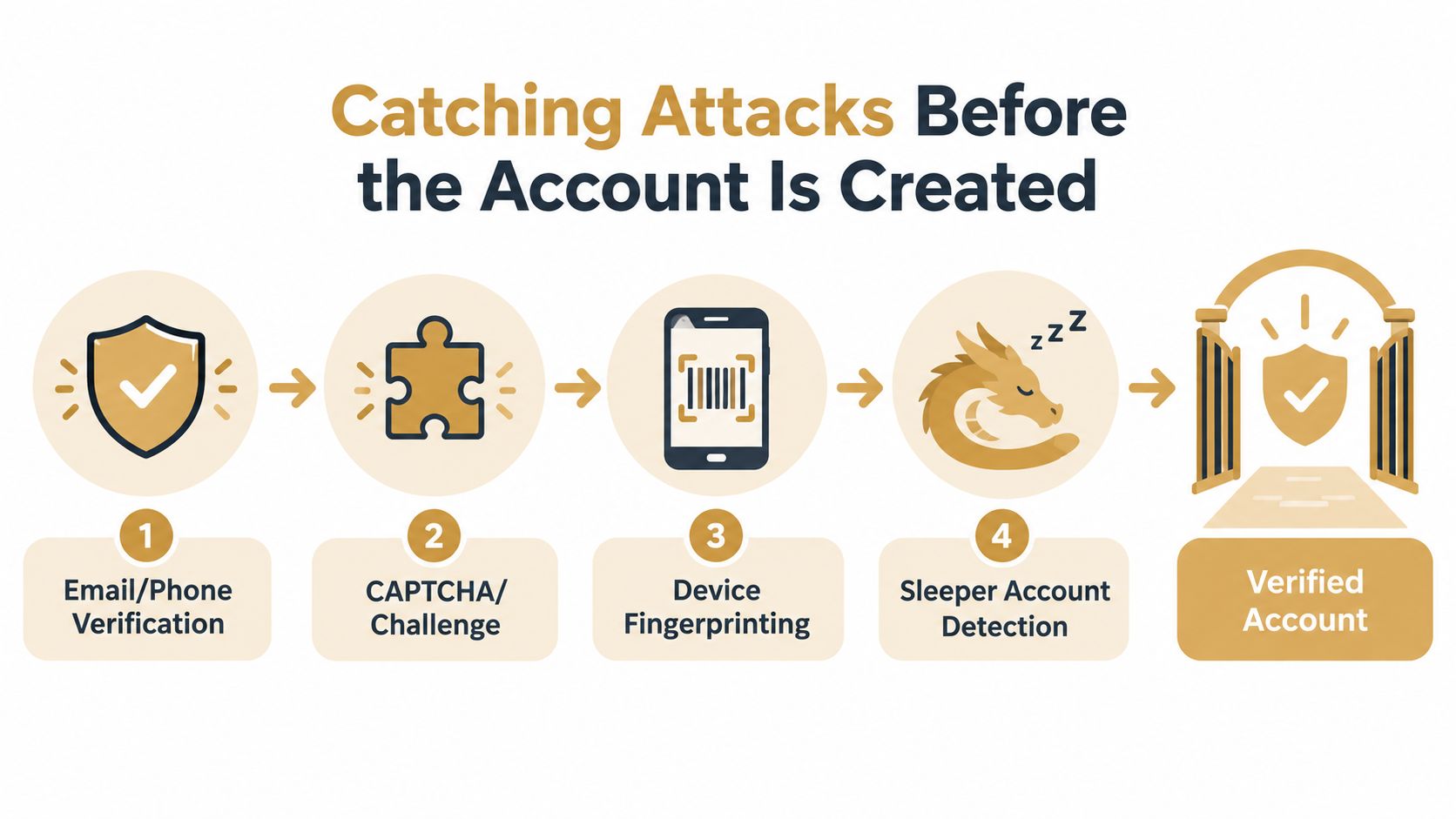
A lot of takeover damage starts before a real customer ever exists. Attackers create trial accounts, warm up device identities, test payment instruments, and stash sleeper accounts they can monetize later. If you only score the login, you're already behind.
Stop relying on IP alone
IP-based rules are too brittle because residential proxies and mobile networks make bad traffic look ordinary. The durable signal is identity linkage. Tie email, phone, device token, payment fingerprint, and behavioral patterns into one decision so the actor can't just rotate one field and start over.
That means your signup and trial logic should ask different questions than your login logic. Is the email fresh and disposable. Has the phone number been reused. Does the payment instrument show up across multiple identities. Is the device already linked to prior abuse. These are not edge cases anymore, they're the standard pattern in abuse-heavy products.
Use one verdict, not five disconnected checks
A clean deployment pattern is a single risk verdict that returns allow, review, or block before the action commits. That keeps the decision in one place and makes ops easier when abuse waves hit. It also lets you feed confirmed abuse back into the graph so the next wave is easier to catch.
Products like Portreeve fit naturally here, since it evaluates signup, trial, checkout, and login events inline and returns a deterministic verdict before the action commits. The value isn't magic. It's that the screening happens before account creation or capture, not after cleanup.
Don't treat abuse signals as one-off alerts. Treat them as shared identity evidence that should follow the actor across events.
If you're still doing signup protection with static allowlists and IP throttles, you're giving attackers a cheap reset button. Link the signals, make the decision before the commit, and keep memory across attempts.
Sessions, Tokens, and the Recovery Back Door
Strong login MFA doesn't save you if a stolen session stays alive or recovery paths are soft. That's the mistake I see most often in otherwise mature products. Teams harden sign-in, then leave reset flows, support verification, and session invalidation almost untouched.
Treat recovery as privileged authentication
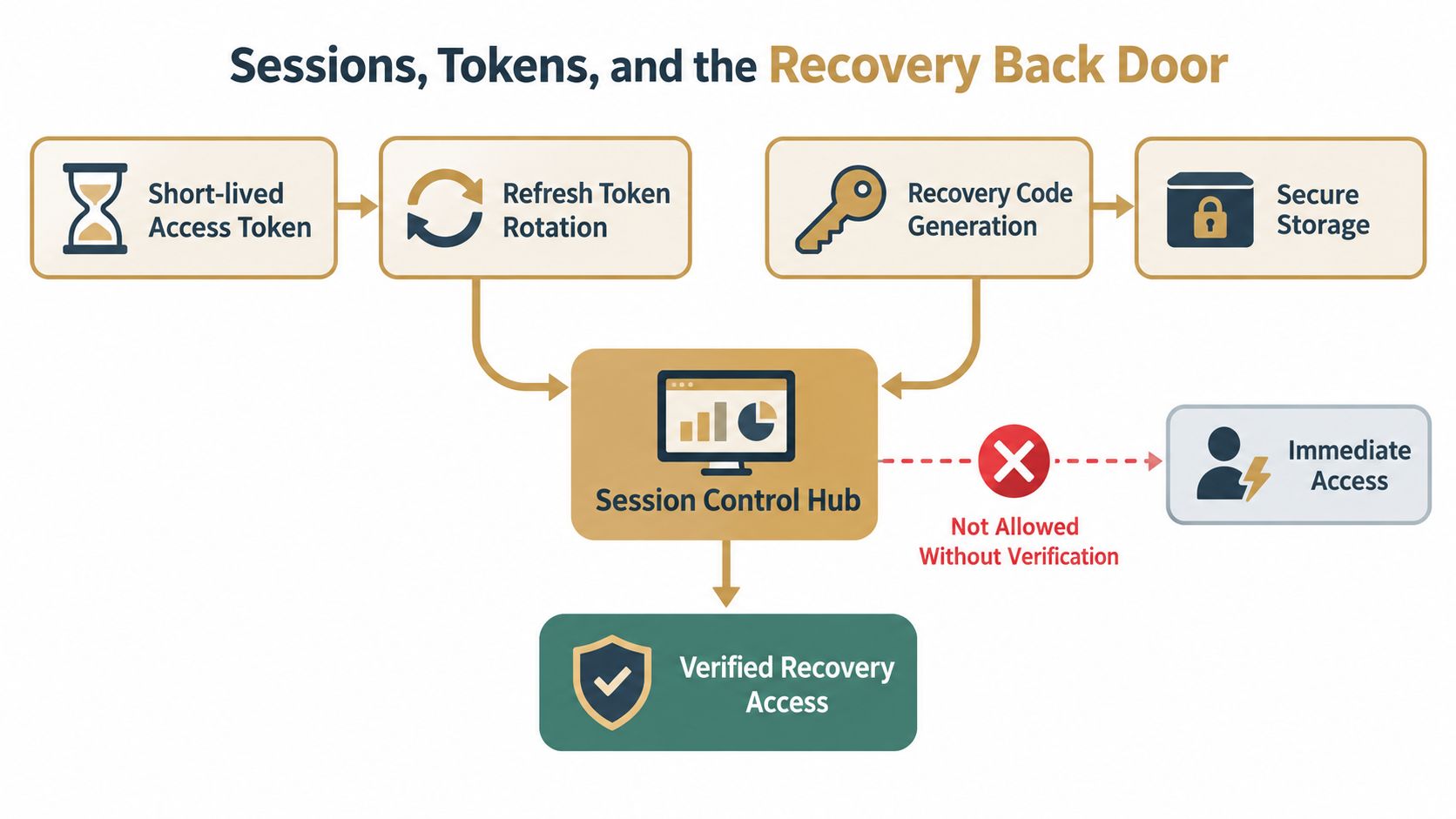
Password reset is authentication. Support-assisted recovery is authentication. Anything that can replace a password or an MFA device needs the same scrutiny as login, or more. Recent guidance makes the same point, and it's the right one.
The practical sequence is straightforward. Bind recovery to a separate authenticator, require step-up for sensitive recovery actions, add cooling-off periods for high-risk resets, and invalidate every active session when passwords, MFA factors, or profile details change. If you don't kill the old session, the attacker doesn't need to log in again.
Protect the session, not just the credential
Use short-lived access tokens with refresh rotation, and revoke refresh tokens on password reset or suspicious account changes. That keeps blast radius down after compromise. It also stops the common failure where a user changes credentials but the attacker's token keeps working in the background.
The biggest recovery traps are boring ones. Email-based reset links that bypass MFA enrollment. Security questions answered from breached personal data. SMS one-time codes vulnerable to SIM abuse. None of those are strong enough to stand alone, and none of them should be your default recovery path.
If you want one audit question, make it this. Can a stolen password, a swapped SIM, or a compromised inbox still reach a live session without step-up? If the answer is yes, you've left the back door open.
Inside a Real Account Takeover Incident Response Playbook
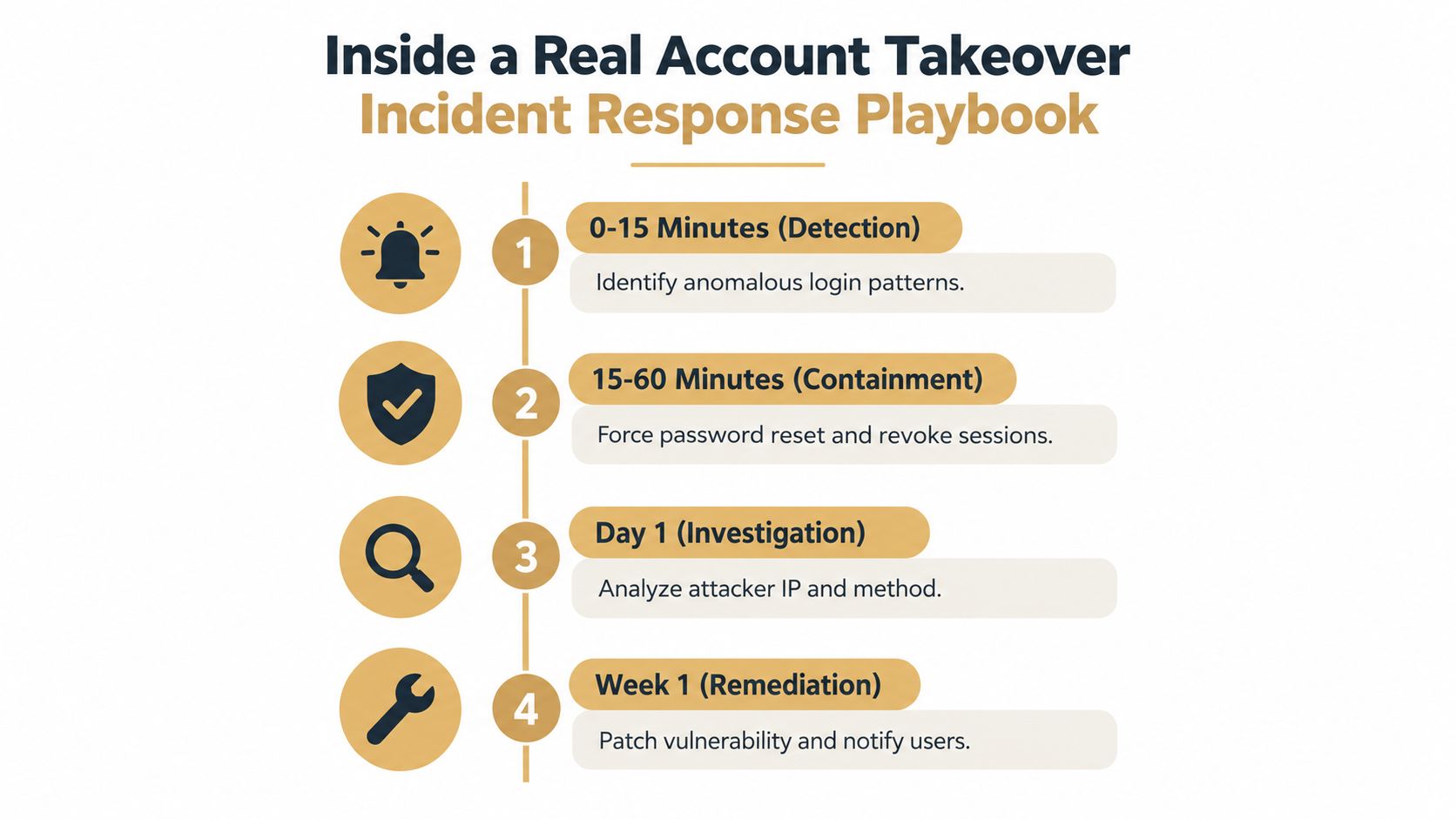
When a takeover lands, speed matters more than elegance. The first ninety minutes should be about confirming the signal, freezing the blast radius, and keeping support from improvising. Don't start with root cause theory. Start with containment.
Contain first, explain later
The first step is to confirm that you're looking at real ATO, not travel noise or a bot test. Then scope the affected cohort through identity linkage, not by chasing one user at a time. Freeze suspect sessions without locking every paying customer out, because collateral damage in the first hour makes support chaos worse.
A solid containment sequence is simple. Force password resets for confirmed impacted users, revoke refresh tokens, require MFA re-enrollment where needed, and throttle login attempts on the impacted cohort until the wave is under control. If your tooling can't do that quickly, your incident response is too manual.
Get support on the same script
Frontline agents need one answer, not three. Tell them what the user should do next, what you're still investigating, and what not to promise. Don't speculate about the intrusion path in customer-facing communication. That usually creates confusion before you have facts.
For internal workflow, a webhook-driven revoke path helps remove the attacker's persistence without waiting for someone to click through a console. A revoke-and-review workflow is a useful model if your team wants a cleaner handoff between detection and containment.
Write the postmortem even when nobody asks for it
After the first day, reconstruct the timeline, tune detections, and identify which control failed first, not just which one failed last. Keep a one-page runbook with on-call roles, user comms templates, and the exact revoke steps your team used. That document should exist before the next incident, not after it.
The goal is not to make incident response feel calm. The goal is to make it repeatable.
Detecting Takeover After a Valid Login
The hardest takeovers are the ones that look legitimate at sign-in. A valid password and a valid session can still belong to an attacker if the credential came from phishing, malware, or recovery abuse. Static login rules won't catch that on their own.
| Signal | What It Detects | Reliability | Tuning Tip |
|---|---|---|---|
| Impossible travel | Fast location shifts that don't fit normal use | Strong when combined with other signals | Suppress for mobile users with known network churn |
| Device fingerprint change | New browser or device identity on an old account | Strong | Compare against historical device clusters, not one prior visit |
| Sudden payout or email change | Monetization and persistence after entry | Very strong | Step up only on sensitive actions, not every click |
| Rapid transaction or export behavior | Attacker moving quickly after login | Strong | Use cohort-specific baselines for power users |
| Login from unusual IP class | Proxy, hosting, or unfamiliar network patterns | Moderate | Don't rely on IP alone, it's too noisy |
| User-agent shift | Automation or script changes mid-session | Moderate | Treat as one input, not a verdict |
Watch the actions that matter
The best post-login detections are tied to account lifecycle abuse, not just the sign-in event. Changes to email, phone, payout methods, beneficiary settings, or export behavior often show the attacker trying to lock in control or extract value. That's where step-up authentication belongs.
If you need a login-specific workflow reference, post-login takeover detection guidance is a useful anchor for how to think about those signals without overfitting to one device or one IP. Keep the logic focused on identity-linked behavior, not a single network artifact.
Tune for normal movement, not perfect stability
Mobile users hop networks all the time. Legitimate users also switch devices, travel, and log in from work and home. Your job is to separate ordinary churn from a session that suddenly starts changing profile data, payment data, or export behavior at speed.
The strongest signals are usually the ones tied to value transfer, not the first login after compromise.
In production, the signals that consistently pay off are the ones that combine device change, risky action, and identity linkage. If a valid session suddenly starts behaving like a fresh attacker identity, respond to the behavior, not the fact that the password check passed.
Your Layered Defense Checklist and Next Steps
The right way to prevent account takeover is to treat it as a lifecycle problem. Pre-account controls catch abuse before creation. Login controls stop obvious automation. Session controls limit damage after entry. Recovery controls close the back door. Response controls keep a bad event from turning into a long one.
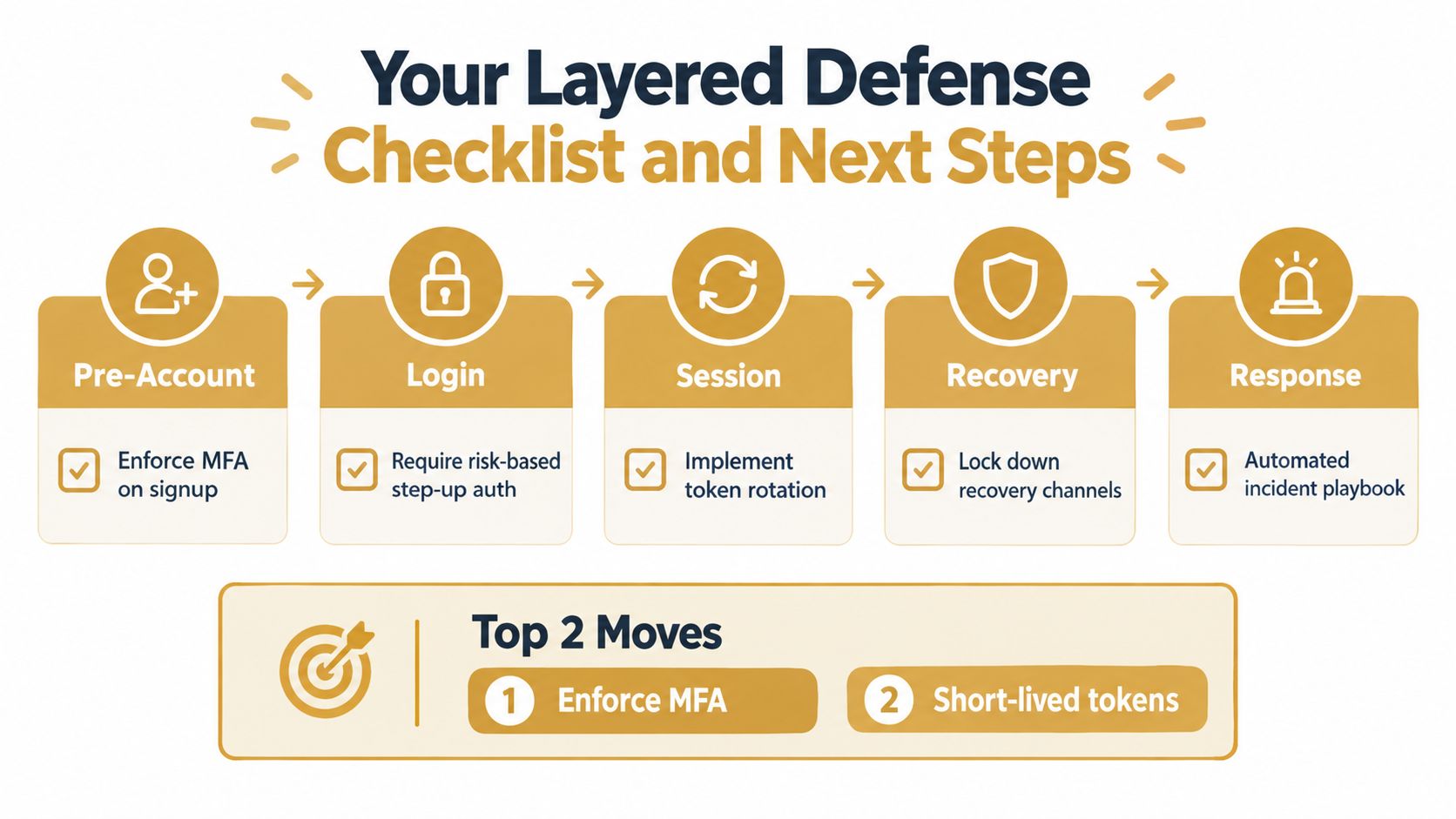
For a small team, the two highest-impact moves are phishing-resistant MFA and automated detection at signup and login. Everything else gets easier once those are in place. If you can only ship a few things this quarter, ship those first.
- Pre-Account: Enforce MFA on signup where it fits your product, and screen trials and checkouts with shared identity signals.
- Login: Require risk-based step-up auth on suspicious sign-ins and known high-value actions.
- Session: Implement token rotation and shorten session lifetimes for high-risk sessions.
- Recovery: Lock down recovery channels, require out-of-band verification, and revoke active sessions after changes.
- Response: Automate the incident playbook so containment isn't dependent on one person being online.
The checklist should stay live. Re-test it every quarter against current takeover techniques, especially the recovery path and the session path. Those are the places attackers use when the login defense itself looks strong.
If you want a practical way to apply this across signup, login, recovery, and response, Portreeve screens events inline and returns allow, review, or block decisions before the action commits. Visit Portreeve if you want to see how that fits into a layered anti-ATO workflow for a SaaS product.